Bird-Boy Device Diagram
Before interacting with the Bird-Boy's UI, take a moment to familiarize yourself with all its analog buttons.
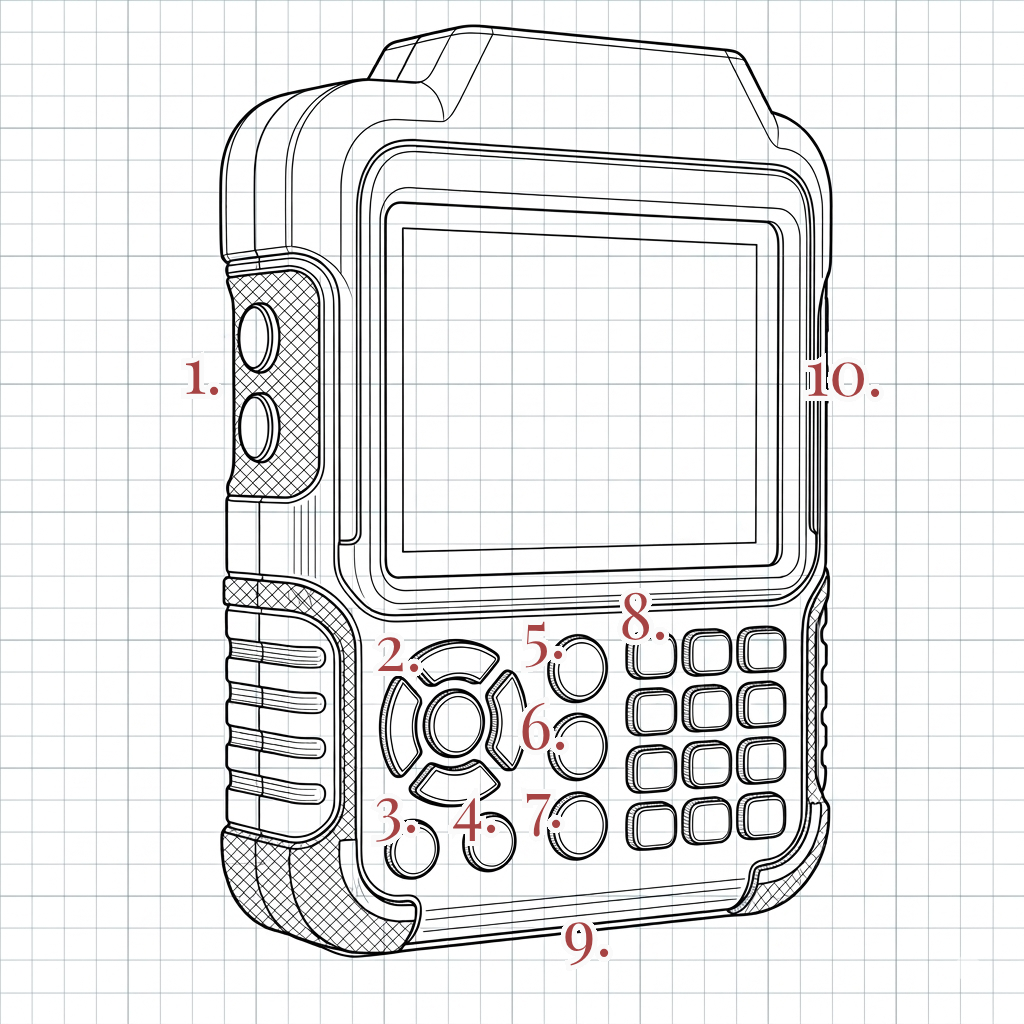
Consult the above reference illustration of the Bird-Boy device:
- Volume buttons (+ and -): Adjusts the output volume of the device.
- D-Pad and Enter buttons: Used for interacting with the device HUD.
- Power button: Turns the device on or off.
- Menu button: Opens the Bird-Boy device menu.
- Database button: Opens the Database mode on your HUD.
- Discover button: Opens the Discovery mode on your HUD to log a species or landmark.
- Maps button: Opens the Maps mode on your HUD.
- Numerical keypad: Used for interacting with the device HUD.
- USB 3.1 Type-C port: Charge your Bird-Boy or connect to another local device.
- Micro-SD card slot: Add or export additional data outside of base memory limit.